Text messages from Enso
How people consent to receive SMS from Enso, and exactly what we send
The short version
Enso is a private social app operated by Ashish Dhanda in Ontario, Canada. Enso has no passwords — you sign in with your phone number and a one-time code. That code is the only text message Enso sends. One message per sign-in request, no marketing, and mobile numbers are never shared with anyone for their own marketing.
Who opts in, and where
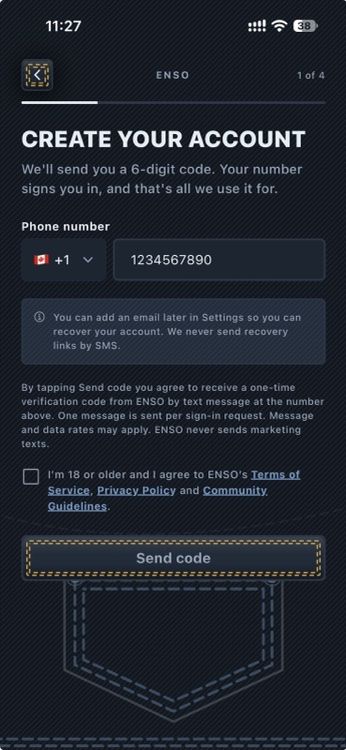
Opt-in happens in exactly one place: the Create your account screen in the Enso mobile app, on iOS and Android. A person enters their own mobile number and taps Send code. There is no keyword opt-in, no web form, no paper form and no verbal opt-in. Numbers are never uploaded, purchased or imported — a number can only enter the system by someone typing it on their own device.
What the screen says
Directly above the consent checkbox, the screen reads:
By tapping Send code you agree to receive a one-time verification code from ENSO by text message at the number above. One message is sent per sign-in request. Message and data rates may apply. ENSO never sends marketing texts.
Beneath it is a checkbox, unticked by default, which must be ticked before the Send code button becomes active:
I’m 18 or older and I agree to ENSO’s Terms of Service, Privacy Policy and Community Guidelines.
Each document name is a link that opens the full text inside the app. No message is sent until the box is ticked.
The flow, in screenshots
What we send
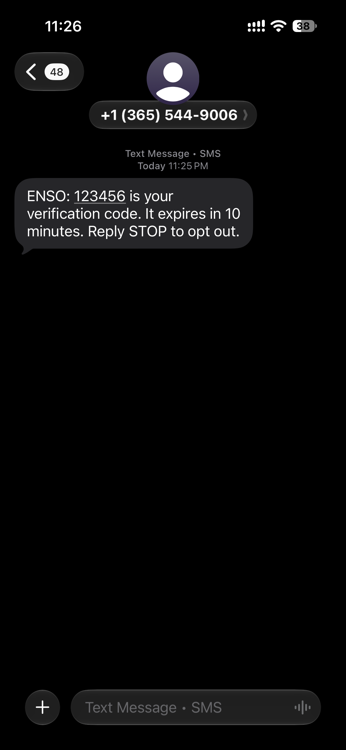
ENSO: 123456 is your verification code. It expires in 10 minutes. Reply STOP to opt out.
- Message frequency: one message per sign-in or verification request you make. Nothing recurring, nothing scheduled.
- Message and data rates may apply, depending on your mobile plan and carrier.
- No marketing. Enso sends no promotional texts and has no mechanism to enrol anyone in any.
- No sharing. Mobile numbers and SMS consent are never shared, sold or rented to third parties or affiliates for their own marketing or promotional purposes.
- Opting out: reply STOP, or simply stop requesting codes. Because the code is how you sign in, opting out means you can no longer sign in by phone — you can add an email address in Settings first if you would like another way in.
- Help: privacy@ensosocial.app